
To connect SpeechExec with an existing SpeechLive user account:
-
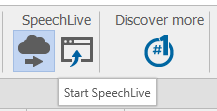
Click on the Start SpeechLive button.
-
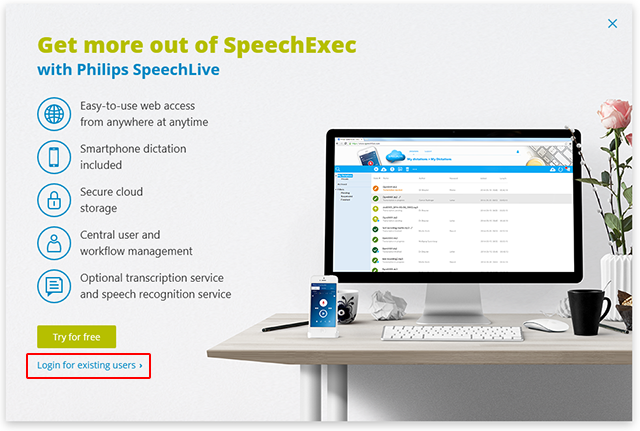
Click on Login for existing users.
-
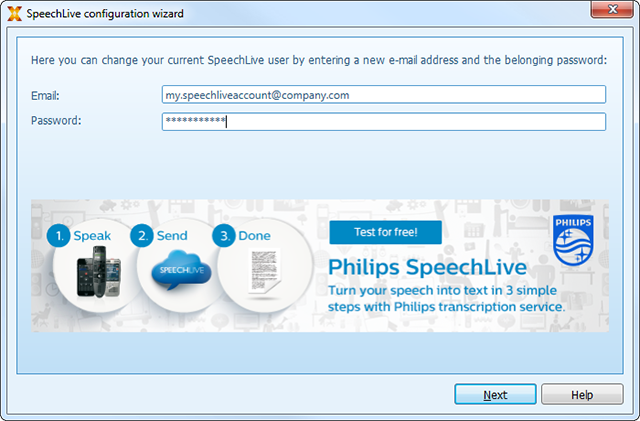
Enter your Email address (User name) and Password for your workflow user and click Next.
-
SpeechExec will now check the availability of your workflow user.
![[Note]](https://www.speechlive.com/fileadmin/helpdesk-paligo/css/image/note.png)
Note Your workflow user account must have been activated by you before.If not, please ask your account administrator to send you an Invitation email.
-
If the SpeechLive transcription services and/or speech recognition service are activated please specify whether you would like to use the service with SpeechExec.
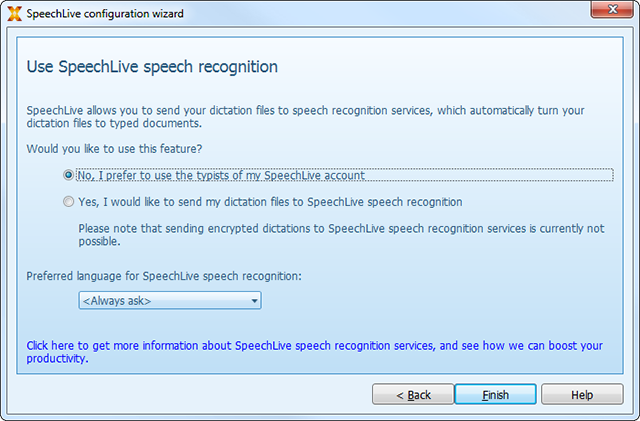
For the SpeechLive speech recognition service it is possible to define a preferred language that will be displayed on top of the language selection list when sending off dictations to the SpeechLive speech recognition service.
-
Click on Finish to finalize the SpeechLive configuration wizard.
-
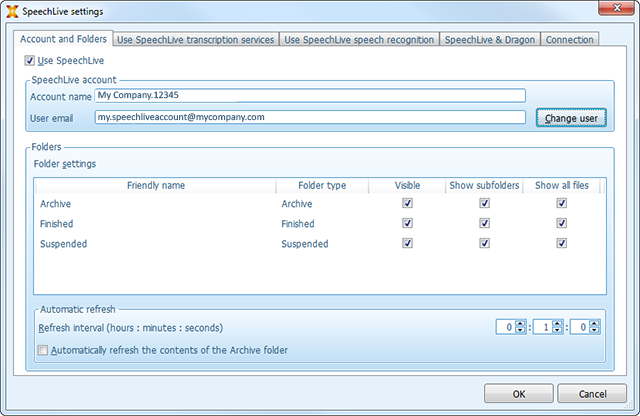
SpeechExec will then display the default setting for the SpeechLive folders.
-
Click OK to close the dialog.
You are now ready to use SpeechLive with SpeechExec. More information on the SpeechExec configuration options for SpeechLive can be found in the SpeechExec online help.